Cisco SG-300 Out Smarted By Smartport
Posted June 6, 2023
By Kevin Schwickrath5 min read
The More You Know
Let me preface this post with, I should RTFM and saved myself some time. I want to give some encouragement to anyone reading this. If you’re just starting out in IT or still struggling to learn something, understand, nobody knows everything. Social media like to portray how easy everything is. What’s hidden is all the struggles leading up to the content.
The Objective
I’ve been looking for a more energy-efficient network switch that is a bit quieter. Until yesterday the main switch in my home lab was a Juniper EX4200-24t. The 4200 is a great switch packed with many features out of the box. I purchased it for $70 shipped about 5 years ago off eBay. The 4200 is hungry, using around 200 watts sitting in the rack. It is also incredibly loud. So much so that you would think I’m keeping a jet engine on idle in my office. It does add a white noise effect to the entire house - if you’re looking for that.
The replacement is an eBay special Cisco SG-300-52P for $80 shipped. This is part of Cisco’s line of small business or prosumer equipment. If memory serves, this product line was born from the Linksys SGE products Cisco purchased in 2003. Cisco’s current model is the CBS350-48P-4G or the CBS350-48P-4X.
You might ask, why did you pick that switch? You could have used “insert option here”. I’m sure, that’s true. The day I clicked buy, this switch was inexpensive. I’ve deployed the older SG-200 without POE several times, so I was somewhat familiar with the product line. I know how to modify the switch for dual power, swap the fans, etc. I have parts for most it on hand too.
The Problem
I started this project late at night. I was tired and should have just gone to bed. Also, because of my prior experience with similar models, I began with some misconceptions and expectations. The short of it is, I didn’t read the docs, I got frustrated, I clicked things, I got more frustrated, I clicked more things… You see where this is going.
My config is a quick script in my old switch, it’s specific, but isn’t complicated. To complicate things the web interface on this switch is maddeningly slow. Page load times can be 5 seconds. If you’re only spending a few minutes in the config fine. 15-20 minutes later, you start to wonder if pouring a case of Red Bull on it might speed things up. This slowness drove my frustration.
The SG-300’s default config isn’t for someone like me. T designers had a normal small office environment in mind. Bob in Sales and Sally in Accounting can plug this box in and it just works. It wants to help you.
My Configs
Looking at an example Juniper config from my switch. Four total VLANs, one is voice, and three for data, LLDP-MED tells the phones to use 17 VLAN for the voice VLAN.
set vlans data-vlan vlan-id 255set vlans voice-vlan vlan-id 17set vlans data-vlan interface ge-0/0/0.0set interfaces ge-0/0/0 unit 0 family ethernet-switching vlan members data-vlanset interfaces ge-0/0/0 unit 0 family ethernet-switching port-mode accessset ethernet-switching-options voip interface ge-0/0/0.0 vlan voice-vlanset ethernet-switching-options voip interface ge-0/0/0.0 forwarding-class assured-forwardingset protocols lldp-med interface ge-0/0/0.0
set vlans data1-vlan vlan-id 254
set vlans data1-vlan interface ge-0/0/1.0set interfaces ge-0/0/1 unit 0 family ethernet-switching vlan members data1-vlanset interfaces ge-0/0/1 unit 0 family ethernet-switching port-mode accessset ethernet-switching-options voip interface ge-0/0/1.0 vlan voice-vlanset ethernet-switching-options voip interface ge-0/0/1.0 forwarding-class assured-forwardingset protocols lldp-med interface ge-0/0/1.0
set vlans data2-vlan vlan-id 253
set vlans data2-vlan interface ge-0/0/2.0set interfaces ge-0/0/2 unit 0 family ethernet-switching vlan members data2-vlanset interfaces ge-0/0/2 unit 0 family ethernet-switching port-mode accessset ethernet-switching-options voip interface ge-0/0/2.0 vlan voice-vlanset ethernet-switching-options voip interface ge-0/0/2.0 forwarding-class assured-forwardingset protocols lldp-med interface ge-0/0/2.0
I plugged in, upgraded the firmware, and set off configuring my interfaces.
I want to take a second and give a shout-out to VanDyke Software’s SecureCRT. It has built-in file transfer capability, including a TFTP Server. I’ve been using SecureCRT and SecureFX for well more than a decade.
SG-300’s Config
What I thought I was trying to deploy.
vlan 255name data-vlanvlan 17name voice-vlaninterface GigabitEthernet1switchport mode accessswitchport access vlan 255switchport voice vlan 17I know this model supports voice VLANs. Let’s go to the CLI.
switch3a68d4(config)#int GigabitEthernet1switch3a68d4(config-if)#voice vlan 17% Unrecognized commandswitch3a68d4(config-if)#voice vlan cos Class of service. enable Voice VLAN enable on interface.switch3a68d4(config-if)#voice vlan enable <CR>switch3a68d4(config-if)#voice vlan enableVoice VLAN State is not OUI-enabled.Oof. Back to the web interface, maybe I need to turn something on.
Clicking around, very slowly, I can’t find these OUI settings.
Whatever, I’ll build trunks and set LLDP. It’s 10:30 PM and I want to go to bed.
interface gigabitethernet1 switchport trunk allowed vlan add 17 switchport trunk native vlan 255Can’t see how to set a policy. Maybe it is already set when I configure the voice VLAN globally? I see Voice VLAN is set for 17. Maybe I should RTFM. Nah, send it.
I rack the switch. Plug in my laptop and the data VLAN defaults to 1 on half of my ports??? Voice VLAN is 17 on everything with a phone though.
Maybe I didn’t save? Set the configs again.
It did it again, changed data VLAN to 1.
Either I’m crazy or this switch does whatever it wants. I set all the things once more. Again, I thought I did something wrong. I pay attention this time.
I’m not CrAzY. Once more, the switch changed my data VLAN to 1.
Smartport Enters The Chat
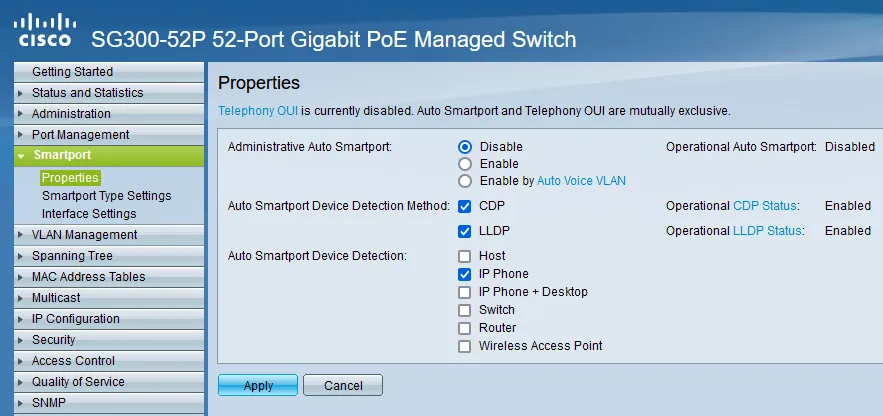
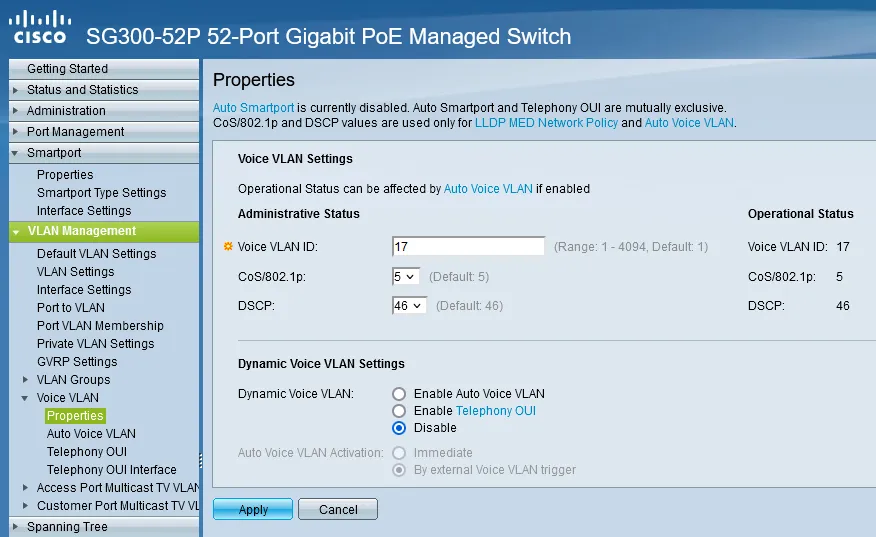
After clicking around I find that Smartport is on. Smartport actually laughing at me. Telling its macro friends what a dork I am. More clicking, I find we’re running a macro that is enabled by default. The macro picked up my voice VLAN but left the data as 1, the default native VLAN. I don’t even use VLAN 1.
I can’t use a macro, I have multiple data VLANs depending on what I’m doing.
A sample of what I ended up with. I disabled auto things.
vlan 255name data-vlanvlan 17name voice-vlan
no lldp med network-policy voice autolldp med network-policy 1 voice vlan 17 vlan-type tagged up 5 dscp 46
voice vlan id 17voice vlan state disabledmacro auto disabledmacro auto processing type ip_phone_desktop disabledmacro auto processing type switch disabledmacro auto processing type ap disabled
interface gigabitethernet1 switchport trunk allowed vlan add 17 switchport trunk native vlan 255 lldp med network-policy add 1
Few Setting Screens
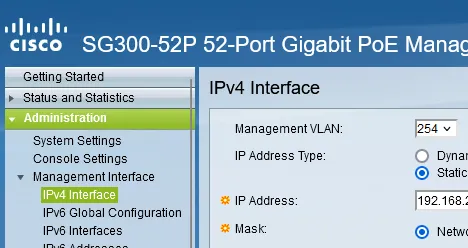
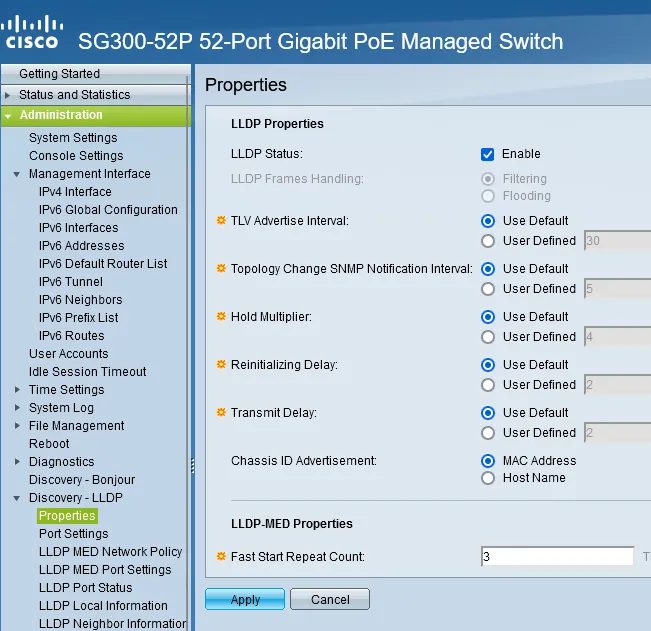
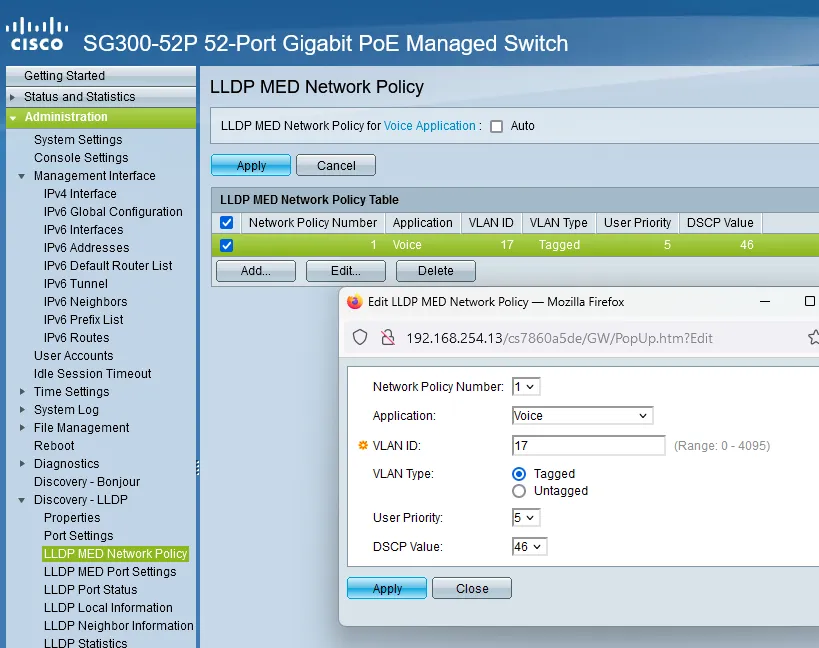
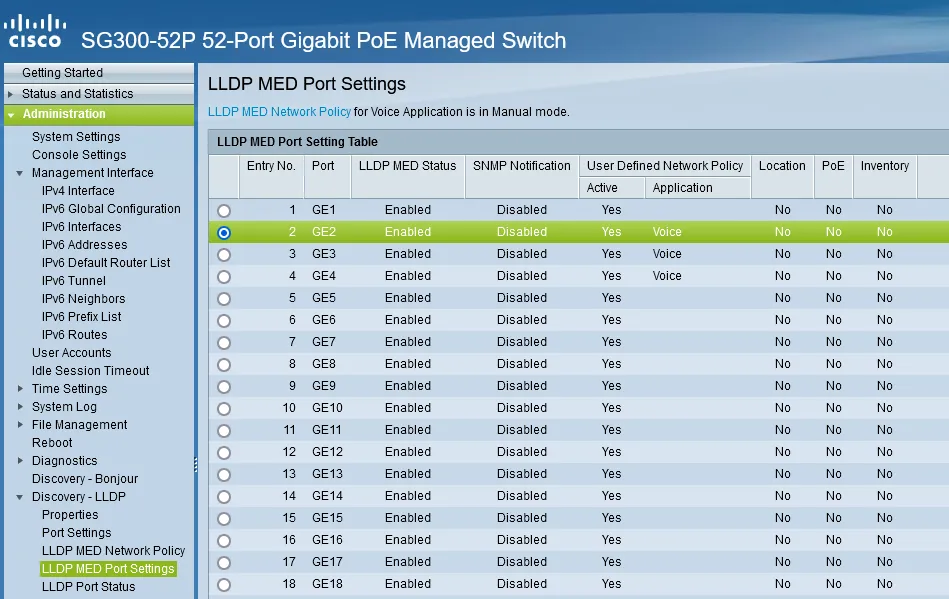
Conclusion
By default Smartport the will override static port configurations, auto-apply policies, and run macros. The issue is, my network has some unique labby configurations that don’t script very easily. Some features that were giving me trouble:
- Auto Smartport - uses macros to dynamically configure ports based on what you plug in.
- Auto Voice VLAN - discovers the voice VLAN from other sources and synchronizes it.
- Telephony OUI - When matching traffic is received, the port is added to the voice VLAN.
Some of these features work together, and some operate interdependently depending on the switch and individual port configurations. Cisco’s default policy is, the switch should assign any phone to the voice VLAN, 17, and leave the native VLAN, 1 by default. If another switch is already configured the new switch should learn the config from the existing environment.
I don’t like auto-policies overriding static configurations. I understand why someone might want that though.
This post is licensed under CC BY 4.0 by the author.
Related Posts
Configuring OPNsense Firewall and NAT
!Finished project Finished product
Configuring OPNsense Multi-WAN
!Finished project Finished product
Installing OPNsense
!Completed project View Finished product